Start a draft
Type here or choose an example. Opening the assistant carries your draft into its composer.
 Lattice One
Lattice One / Mac desktop in development
Read the request. Work through the details.
Leave with a reply and a plan.
Email, calendar, files and AI in one desktop workspace. Keep the context close and finish the task in front of you.
Desktop edition in development; public setup is not open yet. Try the separate web assistant today.
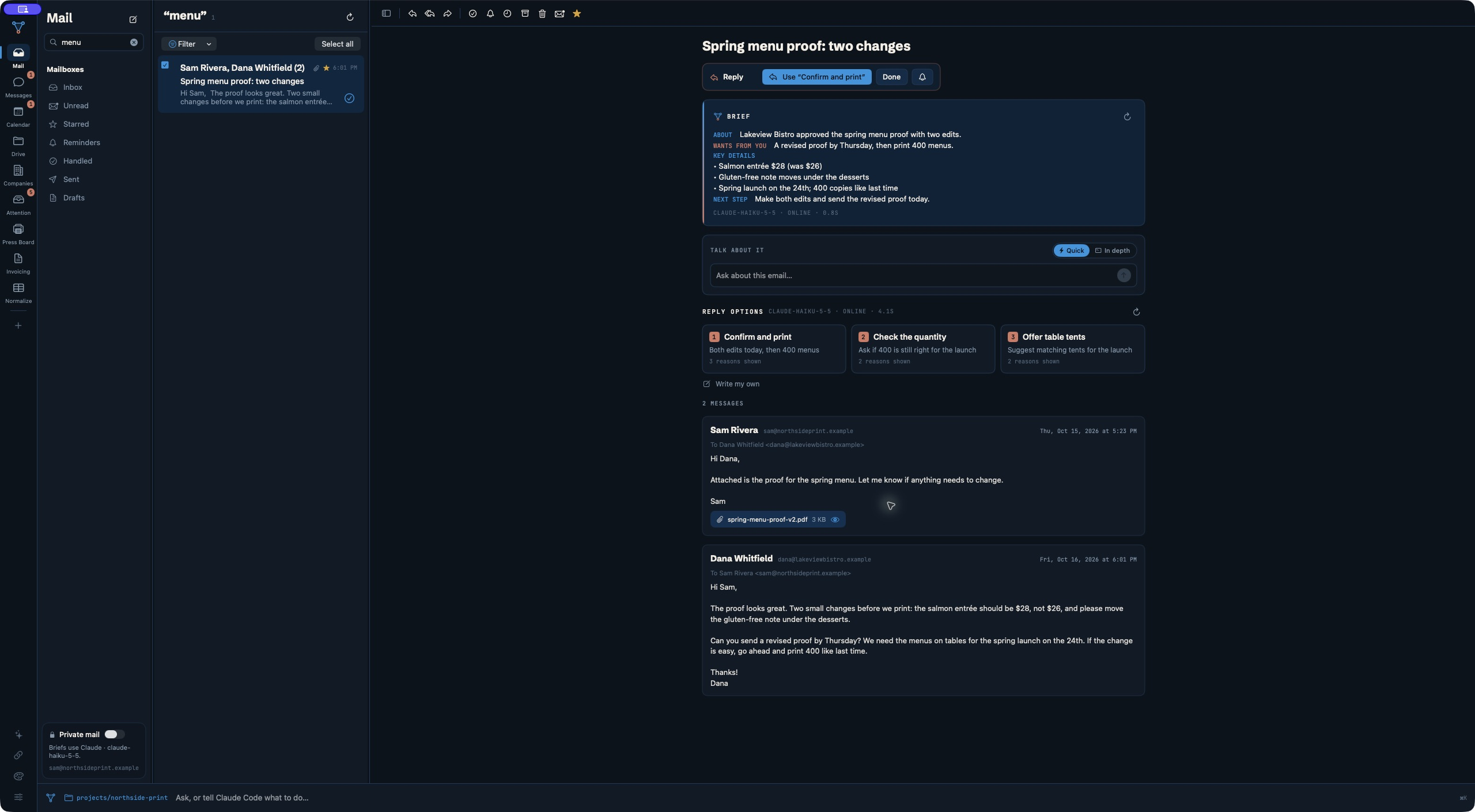
See what the functions do
Explore details from the actual desktop capture. These controls change the preview below; they do not run the app.
The brief pulls out what the sender wants, the key details and a suggested next step. Read the original conversation beside it before deciding what to do.
AI suggestions need your review. You choose the next action.
Calendar brings your schedule into the hub, so checking your day does not mean leaving the conversation behind.
Drive and attachment previews help you return to the document behind a request. Check the source instead of relying on an AI summary alone.
Handled threads and reminders help separate finished conversations from work you need to revisit.
These functions exist in the shared desktop foundation. One’s public desktop setup, included features and pricing will be confirmed before release. No desktop subscription is sold here.
Available today / Web assistant
Find the words. Understand the document.
Follow a question to its sources.
Start with up to five free visitor questions. Sign-in is currently unavailable. Visitor chats are unsaved; export before leaving.
What you get
Free to start
Pro is not currently available to buy
Open the free assistantCompare Free and Pro / Manage billingVisitor attachments: one file at a time. Signed-in: up to three. PDFs up to 10 MB; photos up to 5 MB. Review AI answers before using them.
Start with the task
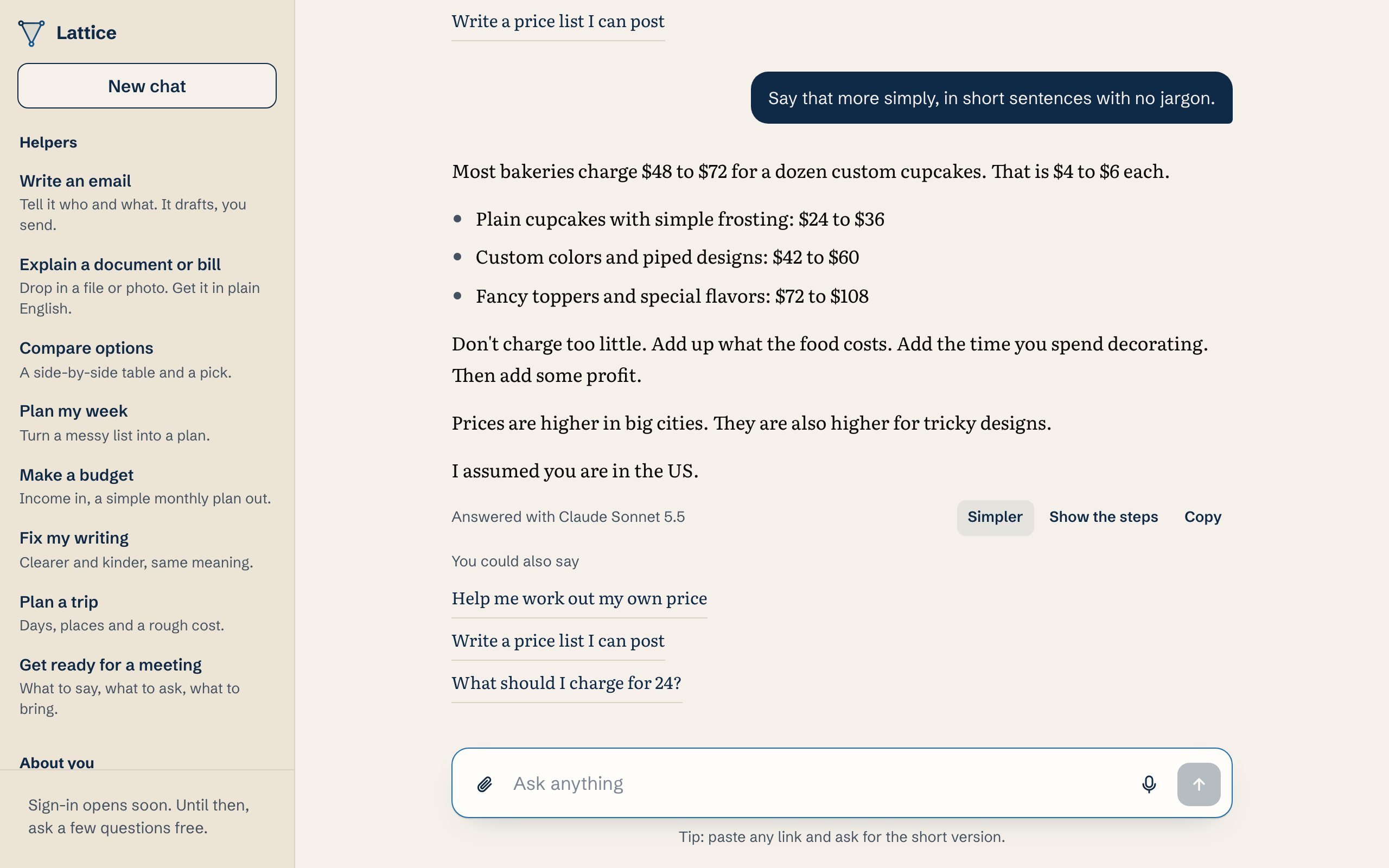
“Say that more simply, in short sentences with no jargon.”
A recorded assistant response rewrites a fictional bakery explanation into shorter sentences. Review and edit before using it.
Type here or choose an example. Opening the assistant carries your draft into its composer.
Edit the question and attach a supported file if useful. Press Send to submit.
Check facts and linked sources. Export a visitor chat before leaving if you want to keep it.
Before you ask
Visitors can start with five free questions, less any already used. The assistant shows your remaining allowance. The visitor count resets after 30 days without another question. Signed-in accounts have a separate monthly allowance; research has additional limits. At the limit, the assistant explains available sign-in or upgrade options. Check the displayed plan and checkout terms before paying.
Turn a rough thought into a message you can review and edit before using.
Attach a supported PDF or photo and ask about its contents. Check the answer against the original.
Web research returns source links so you can inspect where an answer came from.
Messages and attachments pass through our server to the answering AI provider. Visitor chats are unsaved; local About you, projects and memory can remain in this browser. Signed-in account storage changes what persists. Memory starts off; turning it off does not delete saved facts. Avoid sensitive material you are not authorized to share.
Privacy and data handlingNo account is required for the visitor allowance. Current sign-in availability is shown beside the composer. When available, Google sign-in enables a separate monthly allowance and account history.
Visitor chats stay in the current tab and are not saved as account history. Export before leaving. Signed-in chats can use account storage. Local profile and memory entries have separate persistence and deletion controls.
Yes. Use the paperclip in the assistant: PDFs up to 10 MB and photos up to 5 MB. Visitors attach one file at a time; signed-in users can attach three. Files pass to the answering AI provider.
AI models generate the response. When web research is used, the answer includes source links. Ordinary writing and document answers are not necessarily web-verified. Review important claims yourself.
The assistant stops new requests and explains the available next step. If sign-in is available, an account has a separate monthly allowance; plan upgrades require checkout. There is no automatic purchase.